PS3 Eye for Head and Eye Tracking
Yes, the PlayStation Eye (PS3 Eye) works with the Beam Eye Tracker, with the PS3EyeDirectShow driver. It offers 480p at 60fps in the $30 to $60 range, with a 56° or 75° field of view.
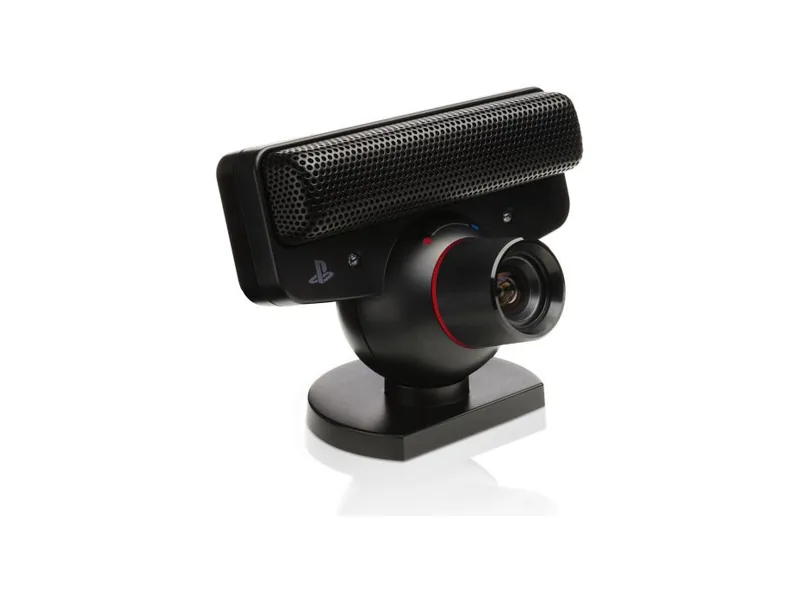
- Works with the Beam Eye Tracker
- Yes, with the PS3EyeDirectShow driver
- Setting to use
- 480p 60fps
- Resolutions
- 480p (640x480) and 240p (320x240), each at 60, 30 or 15fps, with the PS3EyeDirectShow driver
- Field of view
- 56° or 75°, set on the lens
- Focus
- Fixed
- Connection
- USB 2.0
- Made by
- Sony, for the PlayStation 3 (2007)
- Price tier
- $30 to $60
Thank you for supporting us through our affiliate links. As an Amazon Associate, we earn from qualifying purchases, at no extra cost to you.
What the community says
Why it suits head and eye tracking
-
Frame Rate
480p at 60fps, twice the frame rate of a typical 30fps webcam.
-
Narrow FOV
Turn the lens to 56°, so your face fills more of the picture.
-
Illumination Robustness
Sony built it to perform in low light.
-
Automatic Framing Off
No automatic framing, so the frame stays the same as when you calibrated.
Best settings
-
Install the driver
Windows has no driver for the PS3 Eye. Install PS3EyeDirectShow, the driver we tested with the Beam Eye Tracker, then plug in the camera.
-
Choose 640x480
In the Beam Eye Tracker, open Tracker Settings, set the camera access to Exclusive and select the PS3 Eye. Then pick 640x480 at 60fps under Resolution & Framerate.
-
Set the lens to 56°
Turn the lens to its close-up position, so your face fills more of the picture.
-
Glare on your glasses? Add a polarizing filter
If reflections on your glasses cause jitter, hold a polarizing filter in front of the lens and rotate it until they disappear. The video shows a simple holder.
As a webcam
What it does well
- 60fps at 640x480, a high frame rate for its price.
- A two-position lens, 56° for close-up and 75° for a wider view.
- Fixed focus, no autofocus.
Where it falls short
- At 640x480 it suits head tracking best. Eye tracking might fall a bit short, but it is still usable.
- It needs a third-party driver, since Windows has none for it.
- It came out in 2007, so many units for sale today are second hand.
Questions about the PS3 Eye
Does the PS3 Eye work with the Beam Eye Tracker?
Yes. Install the PS3EyeDirectShow driver, and the Beam Eye Tracker reads the PS3 Eye like any other webcam. No other app is needed.
Is 640x480 good enough?
For head tracking, yes. Eye tracking might fall a bit short, but it is still usable, and the higher frame rate makes up for much of the lower resolution.
The PS3 Eye does not show up as a camera. What now?
If your PS3 Eye camera is not showing as an input device in the Beam Eye Tracker, it is likely because the correct drivers are not installed. Windows does not include native drivers for the PS3 Eye camera. To fix this, install the universal DirectShow driver: PS3 Eye Universal DirectShow Driver. After installing the driver, restart the Beam Eye Tracker and your PS3 Eye camera should appear as a selectable input.
How do I stop glare on my glasses?
Put a polarizing filter in front of the camera and rotate it until the reflections on your glasses are gone. A linear polarizing sheet cut to size works, and so does a circular polarizer for camera lenses held in front of the webcam. This video shows a simple holder. It works on any webcam, not only the PS3 Eye. Our Discord thread has examples from the community.
Can I use the PS3 Eye for streaming or video calls at the same time?
Yes. With the camera access set to Shared in Tracker Settings, any other app can use the camera in parallel. With Exclusive, select Eyeware Camera, the virtual camera the Beam Eye Tracker creates, as the camera in the other app (OBS, Discord, a video call).